

Note
New to DeepInverse? Get started with the basics with the 5 minute quickstart tutorial..
DPIR method for PnP image deblurring.#
This example shows how to use the DPIR method to solve a PnP image deblurring problem. The DPIR method is described in Zhang et al.[1]. In Proceedings of the IEEE conference on computer vision and pattern recognition (pp. 3929-3938).
import deepinv as dinv
from pathlib import Path
import torch
from torch.utils.data import DataLoader
from deepinv.models import DRUNet
from deepinv.optim.data_fidelity import L2
from deepinv.optim.prior import PnP
from deepinv.optim import HQS
from deepinv.training import test
from torchvision import transforms
from deepinv.optim.dpir import get_DPIR_params
from deepinv.utils import load_dataset, load_degradation
Setup paths for data loading and results.#
Load base image datasets and degradation operators.#
In this example, we use the Set3C dataset and a motion blur kernel from Levin et al.[2].
# Set the global random seed from pytorch to ensure reproducibility of the example.
torch.manual_seed(0)

device = dinv.utils.get_device()

# Set up the variable to fetch dataset and operators.
method = "DPIR"
dataset_name = "set3c"
img_size = 128 if torch.cuda.is_available() else 32
val_transform = transforms.Compose(
    [transforms.CenterCrop(img_size), transforms.ToTensor()]
)

# Generate a motion blur operator.
kernel_index = 1  # which kernel to chose among the 8 motion kernels from 'Levin09.mat'
kernel_torch = load_degradation(
    "Levin09.npy", DEG_DIR / "kernels", index=kernel_index
).to(torch.float32)
kernel_torch = kernel_torch.unsqueeze(0).unsqueeze(
    0
)  # add batch and channel dimensions
dataset = load_dataset(dataset_name, transform=val_transform)
Selected GPU 0 with 5015.25 MiB free memory
Levin09.npy degradation downloaded in degradations/kernels
Generate a dataset of blurred images and load it.#
We use the BlurFFT class from the physics module to generate a dataset of blurred images.
noise_level_img = 0.03  # Gaussian Noise standard deviation for the degradation
n_channels = 3  # 3 for color images, 1 for gray-scale images
p = dinv.physics.BlurFFT(
    img_size=(n_channels, img_size, img_size),
    filter=kernel_torch,
    device=device,
    noise_model=dinv.physics.GaussianNoise(sigma=noise_level_img),
)

# Use parallel dataloader if using a GPU to speed up training,
# otherwise, as all computes are on CPU, use synchronous data loading.
num_workers = 4 if torch.cuda.is_available() else 0

n_images_max = 3  # Maximal number of images to restore from the input dataset
# Generate a dataset in a HDF5 folder in "{dir}/dinv_dataset0.h5'" and load it.
operation = "deblur"
measurement_dir = DATA_DIR / dataset_name / operation
dinv_dataset_path = dinv.datasets.generate_dataset(
    train_dataset=dataset,
    test_dataset=None,
    physics=p,
    device=device,
    save_dir=measurement_dir,
    train_datapoints=n_images_max,
    num_workers=num_workers,
)

batch_size = 3  # batch size for testing. As the number of iterations is fixed, we can use batch_size > 1
# and restore multiple images in parallel.
dataset = dinv.datasets.HDF5Dataset(path=dinv_dataset_path, train=True)
Dataset has been saved at measurements/set3c/deblur/dinv_dataset0.h5
Set up the DPIR algorithm to solve the inverse problem.#
This method is based on half-quadratic splitting (HQS).
The algorithm alternates between a denoising step and a data fidelity step, where
the denoising step is performed by a pretrained denoiser deepinv.models.DRUNet.
Note
We provide a wrapper for rapidly creating the DPIR algorithm in deepinv.optim.DPIR.
# load specific parameters for DPIR
sigma_denoiser, stepsize, max_iter = get_DPIR_params(noise_level_img, device=device)
early_stop = False  # Do not stop algorithm with convergence criteria

# Select the data fidelity term
data_fidelity = L2()

# Specify the denoising prior
prior = PnP(denoiser=DRUNet(pretrained="download", device=device))

# instantiate the algorithm class to solve the IP problem.
model = HQS(
    prior=prior,
    data_fidelity=data_fidelity,
    stepsize=stepsize,
    sigma_denoiser=sigma_denoiser,
    early_stop=early_stop,
    max_iter=max_iter,
    verbose=True,
)

# Set the model to evaluation mode. We do not require training here.
model.eval()
HQS(
  (fixed_point): FixedPoint(
    (iterator): HQSIteration(
      (f_step): fStepHQS()
      (g_step): gStepHQS()
    )
  )
  (psnr): PSNR()
)
Evaluate the model on the problem.#
The test function evaluates the model on the test dataset and computes the metrics.
save_folder = RESULTS_DIR / method / operation / dataset_name
plot_convergence_metrics = True  # Metrics are saved in save_folder.
plot_images = True  # Images are saved in save_folder.

dataloader = DataLoader(
    dataset, batch_size=batch_size, num_workers=num_workers, shuffle=False
)

test(
    model=model,
    test_dataloader=dataloader,
    physics=p,
    metrics=[dinv.metric.PSNR(), dinv.metric.LPIPS(device=device, norm_inputs="clip")],
    device=device,
    plot_images=plot_images,
    save_folder=save_folder,
    plot_convergence_metrics=plot_convergence_metrics,
    verbose=True,
)
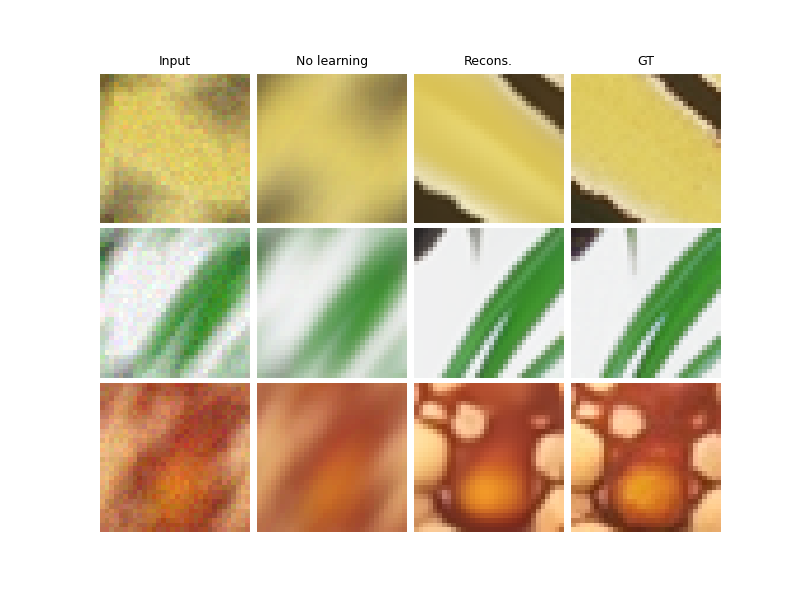
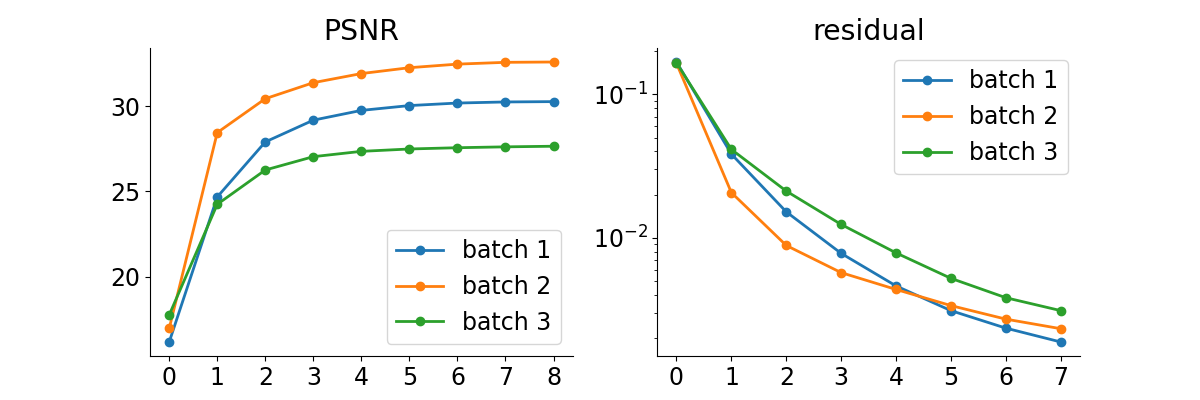
/local/jtachell/deepinv/deepinv/deepinv/training/trainer.py:549: UserWarning: Update progress bar frequency of 1 may slow down training on GPU. Consider setting freq_update_progress_bar > 1.
  warnings.warn(

  0%|          | 0/1 [00:00<?, ?it/s]
Test:   0%|          | 0/1 [00:00<?, ?it/s]
Test:   0%|          | 0/1 [00:00<?, ?it/s, PSNR=29.5, PSNR no learning=16.3, LPIPS=0.04, LPIPS no learning=0.547]
Test: 100%|██████████| 1/1 [00:01<00:00,  1.43s/it, PSNR=29.5, PSNR no learning=16.3, LPIPS=0.04, LPIPS no learning=0.547]
Test: 100%|██████████| 1/1 [00:01<00:00,  1.44s/it, PSNR=29.5, PSNR no learning=16.3, LPIPS=0.04, LPIPS no learning=0.547]
Test results:
PSNR no learning: 16.292 +- 1.124
PSNR: 29.456 +- 0.428
LPIPS no learning: 0.547 +- 0.104
LPIPS: 0.040 +- 0.020

{'PSNR no learning': 16.292423248291016, 'PSNR no learning_std': 1.1241401682251397, 'PSNR': 29.455596923828125, 'PSNR_std': 0.4281599335242275, 'LPIPS no learning': 0.5470223426818848, 'LPIPS no learning_std': 0.10363950764124269, 'LPIPS': 0.04000875850518545, 'LPIPS_std': 0.019526568074898863}
- References:
Total running time of the script: (0 minutes 8.113 seconds)
